

Inspiron
Active member
XDREAMY Version 7.4.0
The wait is over! We've packed this release with incredible features to make your experience faster, smarter, and more enjoyable. Here's what's coming:
إصدار XDREAMY 7.4.0
انتهى الانتظار! تحسينات واضافات في هذا الإصدار بميزات رائعة لجعل تجربتك أسرع وأذكى وأكثر متعة. إليكم ما هو قادم:
---
 What's New in Version 7.4.0
ما الجديد في الإصدار 7.4.0
---
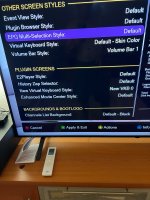
1. New set of premium bootlogo, background with Ancient Egyptians touch.
1. مجموعة جديدة من شعارات الإقلاع والخلفيات المميزة بلمسة مصرية قديمة.
---
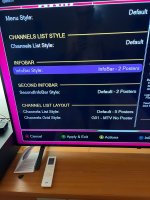
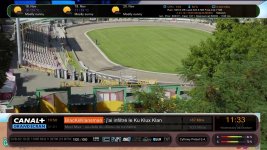
2. New live Arc‑style gauges for SNR, AGC, BER and volume, applied in Infobar and Secondinfobar.
2. مقاييس قوسية حية جديدة لكل من SNR و AGC و BER ومستوى الصوت، مطبقة في شريط المعلومات وشريط المعلومات الثانوي.
---
3. Division of the giant plugin file into small files to make it faster and easy to maintain.
3. تقسيم ملف الإضافة الضخم إلى ملفات صغيرة لجعلها أسرع وأسهل في الصيانة.
---
4. Clean the installation package from useless add‑ons, unused converters and renderers.
4. تنظيف حزمة التثبيت من الإضافات غير المفيدة والمحولات والمعالجات غير المستخدمة.
---
5. Fix Action Key (Yellow Button) to batch‑color channel bouquets or remove the colors, which was broken in the previous version.
5. إصلاح زر الإجراء (الزر الأصفر) لتلوين قوائم القنوات دفعة واحدة أو إزالة الألوان، والذي كان معطلاً في الإصدار السابق.
---
6. Many fixes and improvements under the hood.
6. العديد من الإصلاحات والتحسينات الداخلية.
---
️ IMPORTANT NOTES
️ ملاحظات هامة
1. If you didn't see the new Arc system for any reason make sure to install cairo dependence via command:
opkg install python3-pycairo
1. إذا لم ترَ نظام القوس الجديد لأي سبب، فتأكد من تثبيت الاعتماديات الخاصة بـ Cairo عبر الأمر التالي:
opkg install python3-pycairo
---
How To Update
كيفية التحديث
Option 1: Online Update
الخيار 1: التحديث عبر الإنترنت
```
Menu → XDREAMY Plugin → Check for Updates
```
```
القائمة → إضافة XDREAMY → التحقق من التحديثات
```
Option 2: Manual Install
الخيار 2: التثبيت اليدوي
```
Download from: [https://www.mediafire.com/file/qxc20xrfdb7bmnb/enigma2-plugin-skins-xDreamy_7.4.0_all.ipk/file]
Install via: IPK/DEB Package Manager
```
Option 3: Fresh Install (Telnet)
الخيار 3: تثبيت نظيف (عبر Telnet)
```
wget -q "--no-check-certificate" https://raw.githubusercontent.com/Insprion80/Skins/main/xDreamy/installer.sh -O - | /bin/sh
```
---
#XDREAMY #Version7 #SkinPlugin #Enigma2 #Satellite #Update #NewFeatures #ArabicTranslation
---
The wait is over! We've packed this release with incredible features to make your experience faster, smarter, and more enjoyable. Here's what's coming:
إصدار XDREAMY 7.4.0
انتهى الانتظار! تحسينات واضافات في هذا الإصدار بميزات رائعة لجعل تجربتك أسرع وأذكى وأكثر متعة. إليكم ما هو قادم:
---
What's New in Version 7.4.0 ما الجديد في الإصدار 7.4.0---
1. New set of premium bootlogo, background with Ancient Egyptians touch.
1. مجموعة جديدة من شعارات الإقلاع والخلفيات المميزة بلمسة مصرية قديمة.
---
2. New live Arc‑style gauges for SNR, AGC, BER and volume, applied in Infobar and Secondinfobar.
2. مقاييس قوسية حية جديدة لكل من SNR و AGC و BER ومستوى الصوت، مطبقة في شريط المعلومات وشريط المعلومات الثانوي.
---
3.
Division of the giant plugin file into small files to make it faster and easy to maintain.3.
تقسيم ملف الإضافة الضخم إلى ملفات صغيرة لجعلها أسرع وأسهل في الصيانة.---
4. Clean the installation package from useless add‑ons, unused converters and renderers.
4. تنظيف حزمة التثبيت من الإضافات غير المفيدة والمحولات والمعالجات غير المستخدمة.
---
5. Fix Action Key (Yellow Button) to batch‑color channel bouquets or remove the colors, which was broken in the previous version.
5. إصلاح زر الإجراء (الزر الأصفر) لتلوين قوائم القنوات دفعة واحدة أو إزالة الألوان، والذي كان معطلاً في الإصدار السابق.
---
6. Many fixes and improvements under the hood.
6. العديد من الإصلاحات والتحسينات الداخلية.
---
️ IMPORTANT NOTES
️ ملاحظات هامة
1. If you didn't see the new Arc system for any reason make sure to install cairo dependence via command:
opkg install python3-pycairo
1. إذا لم ترَ نظام القوس الجديد لأي سبب، فتأكد من تثبيت الاعتماديات الخاصة بـ Cairo عبر الأمر التالي:
opkg install python3-pycairo
---
How To Update
كيفية التحديث
Option 1: Online Update
الخيار 1: التحديث عبر الإنترنت
```
Menu → XDREAMY Plugin → Check for Updates
```
```
القائمة → إضافة XDREAMY → التحقق من التحديثات
```
Option 2: Manual Install
الخيار 2: التثبيت اليدوي
```
Download from: [https://www.mediafire.com/file/qxc20xrfdb7bmnb/enigma2-plugin-skins-xDreamy_7.4.0_all.ipk/file]
Install via: IPK/DEB Package Manager
```
Option 3: Fresh Install (Telnet)
الخيار 3: تثبيت نظيف (عبر Telnet)
```
wget -q "--no-check-certificate" https://raw.githubusercontent.com/Insprion80/Skins/main/xDreamy/installer.sh -O - | /bin/sh
```
---
#XDREAMY #Version7 #SkinPlugin #Enigma2 #Satellite #Update #NewFeatures #ArabicTranslation
---




 Blazing-Fast Media Engine