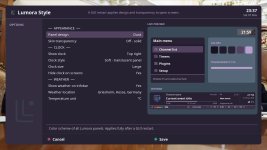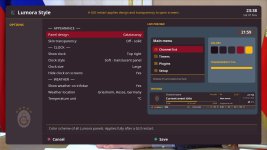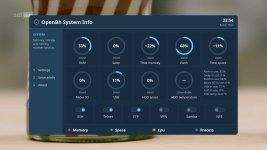
LumoraFHD – new skin for OpenBH 6.0 (work in progress)

tud2007

Member
Hello friends,

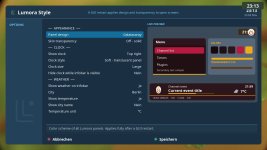
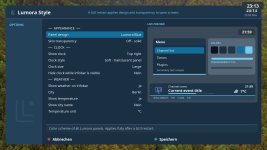
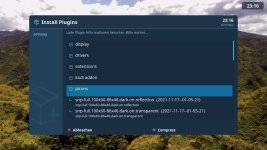
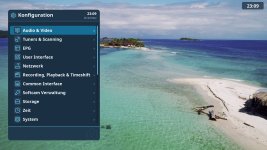
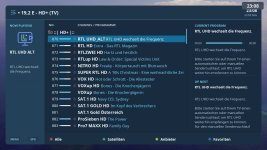
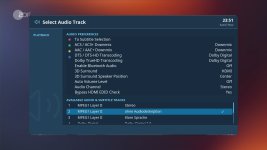
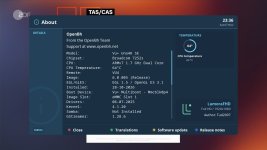
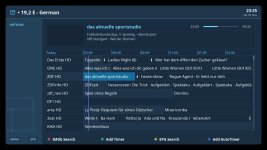
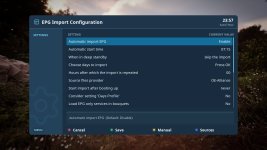
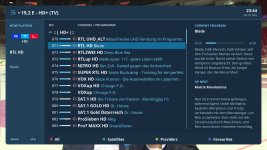
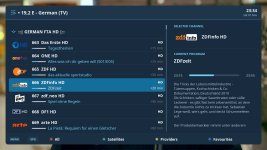
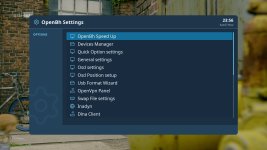
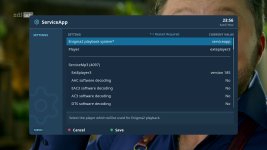
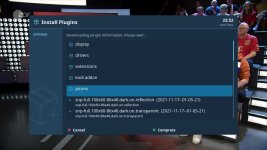
I'm working on a new skin called LumoraFHD for OpenBH 6.0. Most of it was developed with AI, as I don't have much free time. Even so, it took several days of work. Respect to those who earlier manually skinned every screen and detail without AI :)

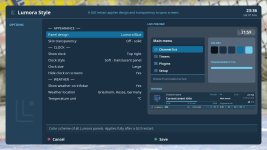
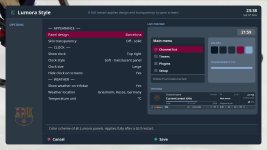
It's still unfinished. I haven't covered all the screens yet, and I'm still testing the layouts. It comes with a Lumora Style plugin that offers fixed color themes as well as custom colors. You can even pick a football team and the skin takes on its colors and logo, as in the last screenshot :)

I need a bit more time before I can release it, even for a first public test. I mainly use OpenBH and can only test on my Vu+ Uno4K SE, so I can't promise it works on other images or boxes. For that reason I'll share it only here in this forum once it's ready.

Feedback and screenshots are welcome in the meantime.


Regards
 

Attachments

  • about.jpg
    about.jpg
    331.4 KB · Views: 58
  • style.jpg
    style.jpg
    164.2 KB · Views: 55
  • style plugin.jpg
    style plugin.jpg
    189.2 KB · Views: 55
  • second infobar.jpg
    second infobar.jpg
    256 KB · Views: 52
  • plugins.jpg
    plugins.jpg
    240 KB · Views: 50
  • menu.jpg
    menu.jpg
    262.9 KB · Views: 56
  • infobar.jpg
    infobar.jpg
    281.6 KB · Views: 59
  • channel list.jpg
    channel list.jpg
    238.8 KB · Views: 61
@tud2007;

Colors,styles are gorgeous :)
I liked it so much.
Your skin work out likes to oe2.5 dream skins .
I am looking forward to seeing it asap

I can test and inform you bugs or thoughts if you send test skin.
 
I wish you success in this wonderful project.
It looks like a beautiful and wonderful skin; I'm eagerly awaiting its release. Thank you very much.
 
Hi, there is no separate renderer for the skin; everything is embedded in the style plugin and inline applets within the skin. I'll try to publish the first design by tomorrow. I also need to learn how to create an IPK package :unsure:
 
@Ev0 @AlexWilMac ;
Need your help to create IPK package.

To create an .ipk package for Enigma2 receivers, you must arrange your plugin files into a specific Unix directory structure alongside a mandatory CONTROL metadata directory, and then pack them using a build tool.
You can build the file directly on your Enigma2 box using ipkg-build via Telnet/SSH.


1. Set Up the Workspace Directory
Connect to your receiver via FTP (using a client like FileZilla) and create a workspace directory on your hard drive or USB stick, for example:
/media/hdd/myipk/


2. Replicate the Enigma2 Target Directory Tree
Inside your workspace folder, create the exact folder structure where your plugin files belong on the receiver. For example, if your plugin files go into the standard extension directory, build this structure:
/media/hdd/myipk/usr/lib/enigma2/python/Plugins/Extensions/MyPluginName/
Place all your Python files (.py), skins, and assets inside that final directory.


3. Create the CONTROL Metadata Folder
In the root of your workspace (/media/hdd/myipk/), create a new folder named exactly CONTROL (all uppercase). Inside this folder, create a plain text file named control (all lowercase) with no file extension. Open it with a Linux-compatible text editor (like Notepad++ or VS Code, using LF line endings) and fill out the package metadata:

Code:
Package: enigma2-plugin-extensions-mypluginname
Version: 1.0
Description: A short description of what my plugin does.
Section: extra
Priority: optional
Maintainer: YourName
Architecture: all
Depends: enigma2

(Optional: You can also place postinst or preinst shell scripts inside the CONTROL folder if you need custom scripts to run right after or before installation).


4. Package the IPK via Terminal
  1. Establish a Telnet or SSH connection to your receiver using a terminal or PuTTY.
  2. Install the compilation tools on your receiver if they aren't already present. You can download and manually install opkg-tools or Ipkg_Builder, or run:
    bash
    Code:
    opkg update && opkg install opkg-utils


  3. Navigate to your staging folder and pack the directory:
    bash
    Code:
    cd /media/hdd/ipkg-build myipk
    Use code with caution.

    (Note: Depending on the image, the command might be opkg-build myipk).
Your finished .ipk file will be generated directly inside /media/hdd/.


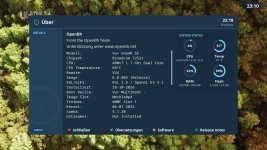
some more images as I cannot edit the first message, ipk package follows after last checks
 

Attachments

  • audiotrack.jpg
    audiotrack.jpg
    147.2 KB · Views: 15
  • about.jpg
    about.jpg
    157.6 KB · Views: 13
  • infobar.jpg
    infobar.jpg
    338.7 KB · Views: 15
  • help.jpg
    help.jpg
    200.1 KB · Views: 13
  • gridepg.jpg
    gridepg.jpg
    198.9 KB · Views: 12
  • epgimport.jpg
    epgimport.jpg
    182.4 KB · Views: 13
  • channellist_slim.jpg
    channellist_slim.jpg
    247.6 KB · Views: 14
  • channellist.jpg
    channellist.jpg
    200.2 KB · Views: 14
  • style.jpg
    style.jpg
    172.3 KB · Views: 11
  • setup.jpg
    setup.jpg
    196.5 KB · Views: 12
  • settings.jpg
    settings.jpg
    182.7 KB · Views: 11
  • serviceapp.jpg
    serviceapp.jpg
    158.4 KB · Views: 13
  • screensaver.jpg
    screensaver.jpg
    170.6 KB · Views: 11
  • plugins.jpg
    plugins.jpg
    195 KB · Views: 13
  • style_barcelona.jpg
    style_barcelona.jpg
    154.9 KB · Views: 13
  • style_dusk.jpg
    style_dusk.jpg
    165.3 KB · Views: 13
  • style_galatasaray.jpg
    style_galatasaray.jpg
    174 KB · Views: 17
  • systeminfo.jpg
    systeminfo.jpg
    149.7 KB · Views: 15
@Ev0 @AlexWilMac ;
Need your help to create IPK package.
you can use this tool
enigma2-plugin-extensions-opkg-tools_1.4_all.ipk

FYI:
The ipk or folder you are trying to pack / unpack must be in /hdd/ipkg-tools folder.

Build ipk packages is really simply.
You don't need strange plugins or devel tools.

1) Upload the file enigma2-plugin-extensions-opkg-tools_1.4_all.ipk in your /tmp and install via addons manual install panel
2) Create a work directory in you box like for example /media/hdd/ipkg-tools/myipk
3) Prepare your plugin with full directory tree (ie usr/lib/enigma2/python/Plugins/Extensions/meoboot)
4) Prepare a folder named CONTROL (uppercase) and put inside the file control (lowercase). If you need you can add the files preinst and postinst too.
5) Upload plugin full path folder and CONTROL folder in your work directory: /media/hdd/ipkg-tools/myipk
6) digit command from telnet

cd /media/hdd/ipkg-tools/

ipkg-build myipk

ALL DONE. You will find your package in your /media/hdd/ipkg-tools/ folder

Br.
 
Back
Top