OpenBh 5.6 Now Available

After upgrading from OpenBH 5.6.005 to 5.6.006 on Zgemma H7, HDMI-CEC TV remote control stopped working completely. This affects both fresh installations and upgrades from 5.6.005.

Symptoms:
  • TV remote (Sony) no longer controls enigma2
  • Log shows: [eHdmiCEC] cannot open /dev/hdmi_cec: Function not implemented
  • RC device detected as type='None' instead of type='remote'
Posible Root cause: The commit [StartEnigma] Switch back to branding (4198dd8) changed config.misc.RCSource default from "hardware" to "branding":
With default="branding", enigma2 does not recognize RC for hdmi_cec input device as a remote control (type='None'), so CEC keypresses are never processed.

Thanks

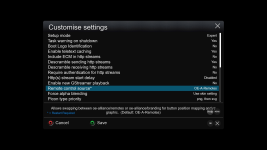
Menu - Setup - System - Customise - Near the bottom of the list "Remote control source" change it back to OE-A Remotes if that box requires it.
 
Menu - Setup - System - Customise - Near the bottom of the list "Remote control source" change it back to OE-A Remotes if that box requires it.
After extensive debugging, I found a working workaround for HDMI-CEC TV remote control on Zgemma H7 running OpenBH 5.6.006 and 5.6.007. The problem does not exist on 5.6.005.

Root cause:
The commit [StartEnigma] Switch back to branding (4198dd8) in 5.6.006 changed config.misc.RCSource default from "hardware" to "branding". With branding mode, enigma2 does not properly recognize the RC for hdmi_cec input device, so TV remote keypresses are not processed.
Additionally, enigma2 does not send an Active Source CEC message to the TV at startup, so the TV does not send remote control keypresses to the box.
Note: [eHdmiCEC] cannot open /dev/hdmi_cec: Function not implemented appears in the log on both 5.6.005 and 5.6.006/007 - this is NOT the cause of the problem. The kernel RC passthrough handles remote control input through /dev/input/event4 independently of eHdmiCEC.

Workaround (tested on 5.6.007):
Step 1: Add these lines to /usr/bin/enigma2.sh, right after the shebang line (#!/bin/bash):

Code:
# Force hardware RC source
sed -i "/RCSource/d" /etc/enigma2/settings && echo "config.misc.RCSource=hardware" >> /etc/enigma2/settings
# Send CEC active source to TV
sleep 15 && cec-ctl --device /dev/cec0 --playback --to 0 --active-source phys-addr=3.2.0.0 &

The first line ensures RCSource=hardware is set on every enigma2 start, even after enigma2 overwrites it during shutdown. The second line sends an Active Source message to the TV after 15 seconds, which tells the TV to start sending remote control keypresses to the box.

Step 2: Apply a patch to InputDevice.pyc to make enigma2 recognize the RC for hdmi_cec input device as a remote control. Without this patch, the device gets type='None' and enigma2 ignores it. Run via SSH:
Code:
python3 << 'EOF'
import marshal

with open('/usr/lib/enigma2/python/Components/InputDevice.pyc', 'rb') as f:
    header = f.read(16)
    code = marshal.loads(f.read())

def find_and_patch(code):
    new_consts = list(code.co_consts)
    for i, const in enumerate(new_consts):
        if hasattr(const, 'co_name') and const.co_name == 'getInputDeviceType':
            new_func = compile('''
def getInputDeviceType(self, name):
    n = name.lower()
    if 'remote control' in n or 'hdmi_cec' in n or 'rc for hdmi' in n:
        return 'remote'
    if 'keyboard' in n:
        return 'keyboard'
    if 'mouse' in n:
        return 'mouse'
    return None
''', '<InputDevicePatch>', 'exec')
            new_consts[i] = new_func.co_consts[0]
            print("Patched!")
        elif hasattr(const, 'co_consts'):
            new_consts[i] = find_and_patch(const)
    return code.replace(co_consts=tuple(new_consts))

patched = find_and_patch(code)

with open('/usr/lib/enigma2/python/Components/InputDevice.pyc', 'wb') as f:
    f.write(header)
    f.write(marshal.dumps(patched))
EOF

This workaround was developed with assistance from AI because I'm not a coder.
Is there a chance for a proper fix in a next version?
 
I will look further at this tomorrow, but first take is this ...........

So a few questions!
Your CEC address (3.2.0.0) implies at least 3 devices linked by hdmi with the TV attached as 2nd box to "something"
So what is your configuration box wise??
I have just tested this on my lounge setup (both with and without change to remote setup) which is pretty simple (E2 receiver into LG TV hdmi1 plus sound bar) and my LG remote operates perfectly..... hdmi CEC addres is 1.0.0.0 ........ note no change of CEC address.
My main test setup where multiple receivers and monitor attach to AV receiver ... note the C++ code opening the hdmi connection so it can talk to TV and CEC address change
14:35:23.8082 [eInit] + (21) input device driver
14:35:23.8083 [eInputDeviceInit] adding device /dev/input/event0
14:35:23.8084 [eRCInputEventDriver] devicename=gigablue remote control
14:35:23.8084 [eRCDeviceInputDev] device "gigablue remote control" is a remotecontrol
14:35:23.8085 [eInputDeviceInit] Found 1 input devices.
14:35:23.8085 [eInit] + (22) Hdmi CEC driver
14:35:23.8086 [eHdmiCEC] ****** open HDMIDEV: /dev/hdmi_cec hdmiFd: 17
14:35:23.8086 [eHdmiCEC] detected physical address change: 1000 --> 1400
14:35:23.8086 [eHdmiCEC] send message 0F 84 14 00 03
14:35:23.8087 [eInit] + (30) eActionMap
14:35:23.8087 [eInit] + (35) CA handler
14:35:23.8088 [eInit] + (35) CI Slots
14:35:23.8089 [CI] scanning for common interfaces..

On the other test setup (3 receivers and sound bar into LG TV) again C++ code opens /dev/hdmi_cec so it can talk to TV.

14:52:31.2179 [eInit] + (21) input device driver
14:52:31.2181 [eInputDeviceInit] adding device /dev/input/event0
14:52:31.2181 [eRCInputEventDriver] devicename=gigablue remote control
14:52:31.2181 [eRCDeviceInputDev] device "gigablue remote control" is a remotecontrol
14:52:31.2182 [eInputDeviceInit] Found 1 input devices.
14:52:31.2182 [eInit] + (22) Hdmi CEC driver
14:52:31.2182 [eHdmiCEC] ****** open HDMIDEV: /dev/hdmi_cec hdmiFd: 17
14:52:31.2182 [eHdmiCEC] detected physical address change: 1000 --> 4000
14:52:31.2183 [eHdmiCEC] send message 0F 84 40 00 03
14:52:31.2183 [eInit] + (30) eActionMap
14:52:31.2183 [eInit] + (35) CA handler
14:52:31.2184 [eInit] + (35) CI Slots
14:52:31.2185 [CI] scanning for common interfaces..
14:52:31.2186 [dvbci][opendevice][CI0] has fd 23 state 4
14:52:31.2186 [dvbci][opendevice][CI1] has fd 24 state 4
14:52:31.2187 [dvbci][setSource][CI0] setSource: A
14:52:31.2188 [dvbci][setSource][CI1] setSource: A

So your issue is that your Sat receiver is unable to talk directly to the TV.
Also if E2 is unable to open this device sending this command is wasted .......sleep 15 &amp;&amp; cec-ctl --device /dev/cec0 --playback --to 0 --active-source phys-addr=3.2.0.0 &amp;

can I see E2 debug logs both with and without these changes ???
 
I will look further at this tomorrow, but first take is this ...........

So a few questions!
Your CEC address (3.2.0.0) implies at least 3 devices linked by hdmi with the TV attached as 2nd box to "something"
So what is your configuration box wise??
I have just tested this on my lounge setup (both with and without change to remote setup) which is pretty simple (E2 receiver into LG TV hdmi1 plus sound bar) and my LG remote operates perfectly..... hdmi CEC addres is 1.0.0.0 ........ note no change of CEC address.
My main test setup where multiple receivers and monitor attach to AV receiver ... note the C++ code opening the hdmi connection so it can talk to TV and CEC address change
14:35:23.8082 [eInit] + (21) input device driver
14:35:23.8083 [eInputDeviceInit] adding device /dev/input/event0
14:35:23.8084 [eRCInputEventDriver] devicename=gigablue remote control
14:35:23.8084 [eRCDeviceInputDev] device "gigablue remote control" is a remotecontrol
14:35:23.8085 [eInputDeviceInit] Found 1 input devices.
14:35:23.8085 [eInit] + (22) Hdmi CEC driver
14:35:23.8086 [eHdmiCEC] ****** open HDMIDEV: /dev/hdmi_cec hdmiFd: 17
14:35:23.8086 [eHdmiCEC] detected physical address change: 1000 --> 1400
14:35:23.8086 [eHdmiCEC] send message 0F 84 14 00 03
14:35:23.8087 [eInit] + (30) eActionMap
14:35:23.8087 [eInit] + (35) CA handler
14:35:23.8088 [eInit] + (35) CI Slots
14:35:23.8089 [CI] scanning for common interfaces..

On the other test setup (3 receivers and sound bar into LG TV) again C++ code opens /dev/hdmi_cec so it can talk to TV.

14:52:31.2179 [eInit] + (21) input device driver
14:52:31.2181 [eInputDeviceInit] adding device /dev/input/event0
14:52:31.2181 [eRCInputEventDriver] devicename=gigablue remote control
14:52:31.2181 [eRCDeviceInputDev] device "gigablue remote control" is a remotecontrol
14:52:31.2182 [eInputDeviceInit] Found 1 input devices.
14:52:31.2182 [eInit] + (22) Hdmi CEC driver
14:52:31.2182 [eHdmiCEC] ****** open HDMIDEV: /dev/hdmi_cec hdmiFd: 17
14:52:31.2182 [eHdmiCEC] detected physical address change: 1000 --> 4000
14:52:31.2183 [eHdmiCEC] send message 0F 84 40 00 03
14:52:31.2183 [eInit] + (30) eActionMap
14:52:31.2183 [eInit] + (35) CA handler
14:52:31.2184 [eInit] + (35) CI Slots
14:52:31.2185 [CI] scanning for common interfaces..
14:52:31.2186 [dvbci][opendevice][CI0] has fd 23 state 4
14:52:31.2186 [dvbci][opendevice][CI1] has fd 24 state 4
14:52:31.2187 [dvbci][setSource][CI0] setSource: A
14:52:31.2188 [dvbci][setSource][CI1] setSource: A

So your issue is that your Sat receiver is unable to talk directly to the TV.
Also if E2 is unable to open this device sending this command is wasted .......sleep 15 &amp;&amp; cec-ctl --device /dev/cec0 --playback --to 0 --active-source phys-addr=3.2.0.0 &amp;

can I see E2 debug logs both with and without these changes ???
My setup:
  • Sony TV (HDMI 3) → NAD AV receiver → Zgemma H7
  • Sony TV (HDMI 3) → NAD AV receiver → VERO V media player
This is why CEC address is 3.2.0.0 - the box is 2 hops from the TV through the AV receiver.

Logs from patched 5.6.007 where HDMI CEC is working:
Enigma2_debug_007_Patched.log

I have freshly installed 5.6.007, without restoring any backup. After completing the minimal setup wizard, I enabled CEC in settings without any additional changes, enabled the debug log, and rebooted.
Enigma2_debug_007_Clean.log

Also, with the previous settings I powered off the sat receiver, AV receiver and TV, then powered them on in this order: AV receiver → TV → sat receiver.
Enigma2_debug_007_Clean_Shut_down.log

And also, you can find a debug log from 5.6.005, immediately booted from 5.6.007, where everything works without any changes - as it has for the past few years. Vero V is also disconnected.
Enigma2_debug_005.log

I also want to thank you for your time and willingness to help with this issue. It is greatly appreciated.
 

Attachments

Can I also see hdmi setup config from menu/setup/hdmi

Attached are screenshots of the HDMI-CEC menu from a clean 007 installation and a 005 installation.
I always restore a backup when installing a new image version, so these are the settings (from 005) I have been using for a long time.

As I noticed the difference in the physical address (on 005 it is 3.2.0.0), I tried setting it manually instead of the default 1.0.0.0 on 007. The remote still does not work.
 

Attachments

Back
Top