NotLikeSomeone
Active member
I updated (unfortunately almost at the same time) two boxes Ultimo4K: the result was both boxes stuck in the loading enigma2 step. I had to start in recovery mode and reflash the slot.


ATV has tried that in the past, users then just decide to do it in telnet to get around it, then cause the same issues anyway and still moan, so it's just lots of work for no gain.I understand the frustration. And figuring out what problems are real as compared to what problems are from an incorrect update is also a job in itself...
The problem is only a select few users of the image will ever see or read the warning messages. And even then, some will insist on doing something different, then complain about the results. It does not take membership or reading a forum to download, install, update OBH.
Limited Resources: The current feeds could be stripped of bloat and you would instantly have as an estimate, 3X-5X more space. But even with plenty of space, creating another feed branch is messy. A separate branch though stops the image update failures and errors in their tracks.
Here is something that can be done by simply altering the software.
Current Online Update system for OBH:
Press Update
↓
A few GUI checks
↓
Start opkg
↓
Hope everything works
↓
Reboot
A better Online Update approach:
Press Update
↓
Is this image allowed to update?
↓
Is the image too old?
↓
Is there enough free flash?
↓
Are there too many packages?
↓
Will dependencies resolve?
↓
Download everything first
↓
Install
↓
Verify important packages
↓
ONLY reboot if successful
Or a bare minimum, simply put a cap on allowed updates. If online updates exceed X amount then refuse to update. This will not be the last big update....
Ok so you want to go back to the old days of all updates being a full reflash then and remove the option of online updates ?Yes, it's only our fault, as always: we don't have lives. So, even if we see the update symbol (and we do, in some case, since BH 2.1.x, so more than 12 years) we MUST pick up our PCs and check if it's safe or not to update, although, in these 12 and more years, it has occured maybe a couple of times that updating ny command line was unsafe.
Actually, more often we have been adviced of the opposite: better to update by command line instead of by GUI.
But, yes, we need to visit everyday the forum (which we don't visit only to ask but also to report and to answer other users, if possible) despite family, sons, parents, and work.
That would be an improvement of what you currently have. No more broken receivers due to improper or failed updates. The image is not updated often as it is, maybe once a month or thereabouts? Look for solutions and you will find them....Ok so you want to go back to the old days of all updates being a full reflash then and remove the option of online updates ?
No, I'd like to go to old days when, if prompted an online update was avalaible, we could trust it. Since 2013 I've lost the count of how many online updates I've done to BH and OBH and I remember of probably not more of a couple of cases they were faluty. And when it happened, the team apologised and immediately warned not to do it and, in a very short time it fixed it. That's the old days style.Ok so you want to go back to the old days of all updates being a full reflash then and remove the option of online updates ?
Ok I repeat once again.No, I'd like to go to old days when, if prompted an online update was avalaible, we could trust it. Since 2013 I've lost the count of how many online updates I've done to BH and OBH and I remember of probably not more of a couple of cases they were faluty. And when it happened, the team apologised and immediately warned not to do it and, in a very short time it fixed it. That's the old days style.
Nobody's perfect but, when I make a mistake, I simply and honestly make amendments.
pli@pli-Precision-T5610:~$ ssh root@192.168.1.2
Warning: Permanently added '192.168.1.2' (ED25519) to the list of known hosts.
root@192.168.1.2's password:
root@sf8008:~# opkg update
Downloading http://feeds.openbh.net/6.0/sf8008/all/Packages.gz.
error: opkg_download_backend: Failed to download http://feeds.openbh.net/6.0/sf8008/all/Packages.gz, wget returned 8.
Downloading http://feeds.openbh.net/6.0/sf8008/cortexa15hf-neon-vfpv4/Packages.gz.
error: opkg_download_backend: Failed to download http://feeds.openbh.net/6.0/sf8008/cortexa15hf-neon-vfpv4/Packages.gz, wget returned 8.
Downloading https://raw.githubusercontent.com/oe-alliance/enigma2-settings-feed/gh-pages/Packages.gz.
Updated source 'enigma2-settings-feed'.
Downloading https://raw.githubusercontent.com/oe-alliance/3rdparty-feed/gh-pages/Packages.gz.
Updated source 'oe-alliance-3rdparty-feed'.
Downloading http://feeds.openbh.net/extra/6.0//Packages.gz.
error: opkg_download_backend: Failed to download http://feeds.openbh.net/extra/6.0//Packages.gz, wget returned 8.
Downloading http://feeds.openbh.net/picons//Packages.gz.
Updated source 'openbh-picon-feed'.
Downloading http://feeds.openbh.net/6.0/sf8008/sf8008/Packages.gz.
error: opkg_download_backend: Failed to download http://feeds.openbh.net/6.0/sf8008/sf8008/Packages.gz, wget returned 8.
Downloading http://feeds.openbh.net/6.0/sf8008/static-all/Packages.gz.
error: opkg_download_backend: Failed to download http://feeds.openbh.net/6.0/sf8008/static-all/Packages.gz, wget returned 8.
Downloading http://feeds.openbh.net/6.0/sf8008/static-cortexa15hf-neon-vfpv4/Packages.gz.
error: opkg_download_backend: Failed to download http://feeds.openbh.net/6.0/sf8008/static-cortexa15hf-neon-vfpv4/Packages.gz, wget returned 8.
Downloading http://feeds.openbh.net/6.0/sf8008/static-sf8008/Packages.gz.
error: opkg_download_backend: Failed to download http://feeds.openbh.net/6.0/sf8008/static-sf8008/Packages.gz, wget returned 8.
root@sf8008:~# cp -p /etc/wgetrc /etc/wgetrc.bak 2>/dev/null
root@sf8008:~# echo 'user_agent = Mozilla/5.0 (X11; Linux x86_64; rv:152.0) Gecko/20100101 Firefox/152.0' >> /etc/wgetrc
root@sf8008:~# opkg update
Downloading http://feeds.openbh.net/6.0/sf8008/all/Packages.gz.
Updated source 'openbh-all'.
Downloading http://feeds.openbh.net/6.0/sf8008/cortexa15hf-neon-vfpv4/Packages.gz.
Updated source 'openbh-cortexa15hf-neon-vfpv4'.
Downloading https://raw.githubusercontent.com/oe-alliance/enigma2-settings-feed/gh-pages/Packages.gz.
Updated source 'enigma2-settings-feed'.
Downloading https://raw.githubusercontent.com/oe-alliance/3rdparty-feed/gh-pages/Packages.gz.
Updated source 'oe-alliance-3rdparty-feed'.
Downloading http://feeds.openbh.net/extra/6.0//Packages.gz.
Updated source 'openbh-extra-feed'.
Downloading http://feeds.openbh.net/picons//Packages.gz.
Updated source 'openbh-picon-feed'.
Downloading http://feeds.openbh.net/6.0/sf8008/sf8008/Packages.gz.
Updated source 'openbh-sf8008'.
Downloading http://feeds.openbh.net/6.0/sf8008/static-all/Packages.gz.
Updated source 'openbh-static-all'.
Downloading http://feeds.openbh.net/6.0/sf8008/static-cortexa15hf-neon-vfpv4/Packages.gz.
Updated source 'openbh-static-cortexa15hf-neon-vfpv4'.
Downloading http://feeds.openbh.net/6.0/sf8008/static-sf8008/Packages.gz.
Updated source 'openbh-static-sf8008'.
root@sf8008:~#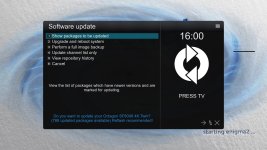
You will find various packages won't install because libs have changed that are not updated in the feeds.Corrupted feeds?? I do not see the feeds as being corrupted. They work fine after adjusting the user agent. Something in Telnet or Terminal like:
cp -p /etc/wgetrc /etc/wgetrc.bak 2>/dev/null
echo 'user_agent = Mozilla/5.0 (X11; Linux x86_64; rv:152.0) Gecko/20100101 Firefox/152.0' >> /etc/wgetrc
opkg update
Code:pli@pli-Precision-T5610:~$ ssh root@192.168.1.2 Warning: Permanently added '192.168.1.2' (ED25519) to the list of known hosts. root@192.168.1.2's password: root@sf8008:~# opkg update Downloading http://feeds.openbh.net/6.0/sf8008/all/Packages.gz. error: opkg_download_backend: Failed to download http://feeds.openbh.net/6.0/sf8008/all/Packages.gz, wget returned 8. Downloading http://feeds.openbh.net/6.0/sf8008/cortexa15hf-neon-vfpv4/Packages.gz. error: opkg_download_backend: Failed to download http://feeds.openbh.net/6.0/sf8008/cortexa15hf-neon-vfpv4/Packages.gz, wget returned 8. Downloading https://raw.githubusercontent.com/oe-alliance/enigma2-settings-feed/gh-pages/Packages.gz. Updated source 'enigma2-settings-feed'. Downloading https://raw.githubusercontent.com/oe-alliance/3rdparty-feed/gh-pages/Packages.gz. Updated source 'oe-alliance-3rdparty-feed'. Downloading http://feeds.openbh.net/extra/6.0//Packages.gz. error: opkg_download_backend: Failed to download http://feeds.openbh.net/extra/6.0//Packages.gz, wget returned 8. Downloading http://feeds.openbh.net/picons//Packages.gz. Updated source 'openbh-picon-feed'. Downloading http://feeds.openbh.net/6.0/sf8008/sf8008/Packages.gz. error: opkg_download_backend: Failed to download http://feeds.openbh.net/6.0/sf8008/sf8008/Packages.gz, wget returned 8. Downloading http://feeds.openbh.net/6.0/sf8008/static-all/Packages.gz. error: opkg_download_backend: Failed to download http://feeds.openbh.net/6.0/sf8008/static-all/Packages.gz, wget returned 8. Downloading http://feeds.openbh.net/6.0/sf8008/static-cortexa15hf-neon-vfpv4/Packages.gz. error: opkg_download_backend: Failed to download http://feeds.openbh.net/6.0/sf8008/static-cortexa15hf-neon-vfpv4/Packages.gz, wget returned 8. Downloading http://feeds.openbh.net/6.0/sf8008/static-sf8008/Packages.gz. error: opkg_download_backend: Failed to download http://feeds.openbh.net/6.0/sf8008/static-sf8008/Packages.gz, wget returned 8. root@sf8008:~# cp -p /etc/wgetrc /etc/wgetrc.bak 2>/dev/null root@sf8008:~# echo 'user_agent = Mozilla/5.0 (X11; Linux x86_64; rv:152.0) Gecko/20100101 Firefox/152.0' >> /etc/wgetrc root@sf8008:~# opkg update Downloading http://feeds.openbh.net/6.0/sf8008/all/Packages.gz. Updated source 'openbh-all'. Downloading http://feeds.openbh.net/6.0/sf8008/cortexa15hf-neon-vfpv4/Packages.gz. Updated source 'openbh-cortexa15hf-neon-vfpv4'. Downloading https://raw.githubusercontent.com/oe-alliance/enigma2-settings-feed/gh-pages/Packages.gz. Updated source 'enigma2-settings-feed'. Downloading https://raw.githubusercontent.com/oe-alliance/3rdparty-feed/gh-pages/Packages.gz. Updated source 'oe-alliance-3rdparty-feed'. Downloading http://feeds.openbh.net/extra/6.0//Packages.gz. Updated source 'openbh-extra-feed'. Downloading http://feeds.openbh.net/picons//Packages.gz. Updated source 'openbh-picon-feed'. Downloading http://feeds.openbh.net/6.0/sf8008/sf8008/Packages.gz. Updated source 'openbh-sf8008'. Downloading http://feeds.openbh.net/6.0/sf8008/static-all/Packages.gz. Updated source 'openbh-static-all'. Downloading http://feeds.openbh.net/6.0/sf8008/static-cortexa15hf-neon-vfpv4/Packages.gz. Updated source 'openbh-static-cortexa15hf-neon-vfpv4'. Downloading http://feeds.openbh.net/6.0/sf8008/static-sf8008/Packages.gz. Updated source 'openbh-static-sf8008'. root@sf8008:~#
The feeds work fine for me after that small edit.
And then for an online update after making that edit, I am greeted with 788 packages. An update of this size can be done online, but careful attention to the smallest details is needed and the update needs to run in terminal. In this example, a network update cut the ssh connection, which required a reset of the connection then again running the terminal upgrade. After the terminal upgrade finished, it was ran two or three more times until opkg list-upgradable came up empty.
On reboot after the 788 online package update, a python package along with alsa needed attention. The python package was causing an enigma2 crash and halted the boot sequence. Much easier to simply load an image...
Now I understand that this image is really a beta image that is listed as a release image, which might confuse some. There are people who do not read anything and press remote buttons instead. Consider how the online update menu is laid out and worded. If you look real hard at the screenshot shown below you will find the words "Reflash recommended!" for 788 packages which sort of sounds like “You can probably update, but flashing would be a little cleaner.”
A lot of users do not visit or read the forums. At minimum, the messaging could be better.
View attachment 6074
I really don't understand what you are trying to do.Geez you folks have problems!
See you later.

