
You are using an out of date browser. It may not display this or other websites correctly.
You should upgrade or use an alternative browser.
You should upgrade or use an alternative browser.

Hacked
Member
We need an update, does not work in openbh-5.0.013/14.
Problem using EPG-Importer.
Cannot access blue button "sources" and yellow button "Manual"
Problem using EPG-Importer.
Cannot access blue button "sources" and yellow button "Manual"

Hi
Using OpenBH 5.5.1.13 on a Vu+Zero4 and always download my
favorite skin which is MX SlimLine.
Here there is a skin problem when I use EPG-Importer.
MX SlimLine needs an update.
Log is attached.
Another problem with the same skin is that when I start recording from HDD, the movie always starts at the end. Have to start it 2 times before it starts at the beginning.
Hope these things get fixed
Using OpenBH 5.5.1.13 on a Vu+Zero4 and always download my
favorite skin which is MX SlimLine.
Here there is a skin problem when I use EPG-Importer.
MX SlimLine needs an update.
Log is attached.
Another problem with the same skin is that when I start recording from HDD, the movie always starts at the end. Have to start it 2 times before it starts at the beginning.
Hope these things get fixed
- Hacked
- Replies: 1
- Forum: OpenBh Updates
Attachments
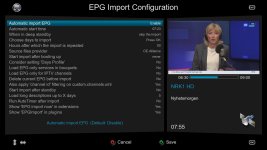
Good new is blue and yellow buttons work even they are hidden.Someone who could fix this?
@Matrix10
The missing blue button "sources" and yellow button "Manual" was re-added to the skin "Mx slim-line np". Thx.We need an update, does not work in openbh-5.0.013/14.
Problem using EPG-Importer.
Cannot access blue button "sources" and yellow button "Manual"
Hi
Using OpenBH 5.5.1.13 on a Vu+Zero4 and always download my
favorite skin which is MX SlimLine.
Here there is a skin problem when I use EPG-Importer.
MX SlimLine needs an update.
Log is attached.
Another problem with the same skin is that when I start recording from HDD, the movie always starts at the end. Have to start it 2 times before it starts at the beginning.
Hope these things get fixed
- Hacked
- Replies: 1
- Forum: OpenBh Updates
Please also re-add those to the skin "Mx slimline".
Thx
Br.
Also mx hq 10 pls.The missing blue button "sources" and yellow button "Manual" was re-added to the skin "Mx slim-line np". Thx.
Please also re-add those to the skin "Mx slimline".
Thx
Br.

Or busy, due to professional affairs!Looks like the old ones have gone home

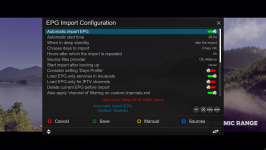
Instructions:
Download and unpack the file and send it by using an ftp tool, for example "winscp" to:
Code:
/usr/share/enigma2/MX_HQ10Note: when I have a free time I will check and fix the other MX-SLIMLINE
Enjoy it
best regards
nunigaia
Attachments
It's fixed, thank you. I think we have to replace that file after each update if it will not be implemented in updates?Or busy, due to professional affairs!
View attachment 5906
Instructions:
Download and unpack the file and send it by using an ftp tool, for example "winscp" to:
Code:/usr/share/enigma2/MX_HQ10
Note: when I have a free time I will check and fix the other MX-SLIMLINE
Enjoy it
best regards
nunigaia
MX_SlimLine update 5.6 and upper verions.
Fixed EPGImport panels.
It should be fixed.
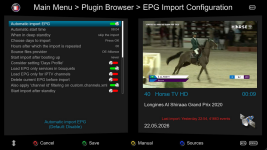
best regards
nunigaia
NOTE: MX-HQ10 is on the feeds
Instructions:
Download and unpack the file and send it by using an ftp tool, for example "winscp" to:
best regards
nungaia
Fixed EPGImport panels.
It should be fixed.
best regards
nunigaia
NOTE: MX-HQ10 is on the feeds
Instructions:
Download and unpack the file and send it by using an ftp tool, for example "winscp" to:
Code:
/usr/share/enigma2/MX_SlimLinebest regards
nungaia
Attachments
Shoud be fixed now! Thanks for reporting it@nunigaia
MX-HQ10 is on the feed list but does not install. Yes,Tar.gz file is unpacking but not onto /usr/share/enigma2 path.

Please retry, and report!
Help us to maintain the board alive, please donate --> https://board.openbh.net/donate/
best regards
nunigaia
Last edited:

Gold_66
Active member
MX_Slim-Line_NP
I had forgotten how beautiful (and fast) this skin was, while trying some other new skins in the last couple of years.
Made some modifications in a few screens, and now it looks even prettier in my opinion.
I hope Matrix10 isn't looking.
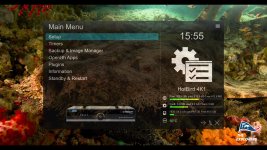
I had forgotten how beautiful (and fast) this skin was, while trying some other new skins in the last couple of years.
Made some modifications in a few screens, and now it looks even prettier in my opinion.
I hope Matrix10 isn't looking.
Last edited by a moderator:
Please " Just FTA Services " screenshots! We have rules ( since long time ago )MX_Slim-Line_NP
I had forgotten how beautiful (and fast) this skin was, while trying some other new skins in the last couple of years.
Made some modifications in a few screens, and now it looks even prettier in my opinion.
I hope Matrix10 isn't looking.
View attachment 5925
You, from long time ago, know our rules -> https://board.openbh.net/help/terms/
Anyway, I edited your post, and just let one screenshot, as all the others don´t match our board rules, sorry for that

best regards
nunigaia
Last edited:
Gold_66
Active member
Ok, no problem.Please " Just FTA Services " screenshots! We have rules ( since long time ago )
Here are deleted screens with FTA services:

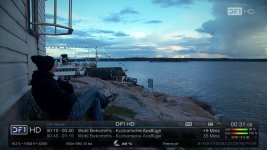
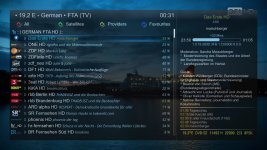

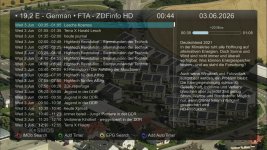

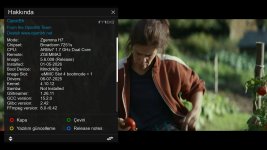
link ? ipkOk, no problem.
Here are deleted screens with FTA services:
View attachment 5930 View attachment 5931 View attachment 5932
View attachment 5933 View attachment 5934
Gold_66
Active member
There's no ipk file, those pics are just slightly modified screens of the BH skin MX_Slim-Line_NP.link ? ipk
If anyone wants to try, first switch to that skin, send the included files in the attached zip to the folders indicated in "Read_Me" file and restart GUI.
Attachments
On vu+ zero with OBH 5.6 in second infobar, the information is not appearing as before.There's no ipk file, those pics are just slightly modified screens of the BH skin MX_Slim-Line_NP.
If anyone wants to try, first switch to that skin, send the included files in the attached zip to the folders indicated in "Read_Me" file and restart GUI.
It's possible to put it back as before?
The rest doesn't need mods, it's fine. Congrats