Vu+ Real Multiboot Now Available

One more question.
Could the fact that multiboot failed to install have caused the boot loader to become corrupted?
After the command :‘cat /proc/cmdline’
I get something like this:
Code:
libata.force=1:3.0G,2:3. 0G,3:3.0G root=/dev/mmcblk0p9 rootfstype=ext4 rootflags=data=journal rootwait rw coherent_pool=2M vmalloc=622m bmem=630m@394m bmem=383m@1665m bmem=443m@2625m

It looks like the bootloader is loading the system from slot 9. (Am I understanding this correctly?)
Do I need to upload a new bootloader?
Thansk.
 
One more question.
Could the fact that multiboot failed to install have caused the boot loader to become corrupted?
After the command :‘cat /proc/cmdline’
I get something like this:
Code:
libata.force=1:3.0G,2:3. 0G,3:3.0G root=/dev/mmcblk0p9 rootfstype=ext4 rootflags=data=journal rootwait rw coherent_pool=2M vmalloc=622m bmem=630m@394m bmem=383m@1665m bmem=443m@2625m

It looks like the bootloader is loading the system from slot 9. (Am I understanding this correctly?)
Do I need to upload a new bootloader?
Thansk.
The multiboot on vuplus box is managed by a custom kernel installed in place of the primary kernel. The bootloader isn't touched at all. If you unzip openbh image into an empty usb stick, you will overwrite the multiboot kernel.
If you remove the rootfs file you won't loose the multiboot image but will be unaccessible.

To remove the multiboot you must use an usb stick. If by using the usb stick the multiboot won't be removed, probably your usb stick is defective
 
The multiboot on vuplus box is managed by a custom kernel installed in place of the primary kernel. The bootloader isn't touched at all. If you unzip openbh image into an empty usb stick, you will overwrite the multiboot kernel.
If you remove the rootfs file you won't loose the multiboot image but will be unaccessible.

To remove the multiboot you must use an usb stick. If by using the usb stick the multiboot won't be removed, probably your usb stick is defective

Thanks for your reply.

Could the HDD be causing this problem?
I have an HDD that I do not remove during flashing.
 
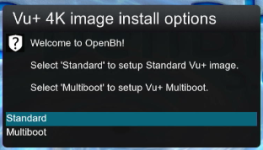
I don't really understand how to multi boot. Install 5.6 from USB, and system ask me if I want standard or multiboot. If I do standard, I don't have multiboot options in shutdown menu, if I go to multiboot, then there are no SLOTS to choose where to install new image from download menu. Any tips or updated instructions, because the one HowTo Vu+ Multiboot in OpenBh 5.2 is killing me all day?
 
I don't really understand how to multi boot. Install 5.6 from USB, and system ask me if I want standard or multiboot. If I do standard, I don't have multiboot options in shutdown menu, if I go to multiboot, then there are no SLOTS to choose where to install new image from download menu. Any tips or updated instructions, because the one HowTo Vu+ Multiboot in OpenBh 5.2 is killing me all day?
Please give us more information about which box you are using.. so we can double check.
 
Thanks for effort. Most likely I did something wrong. But nothing is the same like in instructions how to multiboot in OpenBH 5.2.
 
I confirm the image is broken. Many thanks for reporting!!!!


1768770214192.png
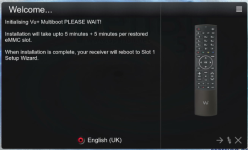
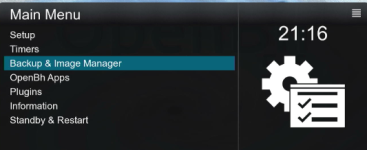
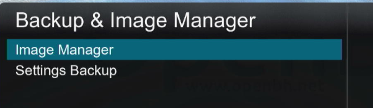
Here i choosed multiboot and pressed ok..
1768770245923.png
Here you have to have a lot of patience... if you are a nerd you can connect to ssh to your box and check what it is doing...
1768770318539.png
the box runs the following command that takes some time...
root 1862 1723 0 21:03 ? 00:00:00 /bin/tar -jcf /tmp/linuxrootfs1.tar.bz2 -C /tmp/mmc --exclude ./var/nmbd --exclude ./.resizerootfs --exclude ./linuxrootfs* --exclude ./.resize
root 1863 1862 97 21:03 ? 00:01:39 bzip2 -f
and then
root 1920 1723 6 21:07 ? 00:00:01 /bin/tar -jxf /tmp/linuxrootfs1.tar.bz2 -C /linuxrootfs1 .
then you should see some opkg command to strip down the "recovery" image

If the process isn't interrupted the box should auto reboot and should have been converted to multiboot.


Until next release:
open ssh and digit
(only for vuzero4k)
dd if=/dev/mmcblk0p4 of=/zImage
cp /zImage /linuxrootfs1/zImage
dd if=/usr/bin/kernel_auto.bin of=/dev/mmcblk0p4

reboot

and continue as follows...


Plug in an usb flash drive,

1768770977166.png

1768770988128.png

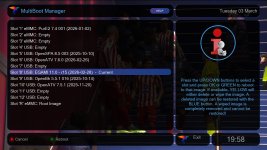
Choose the image you prefer and press green to download

1768771112939.png
 

Attachments

  • 1768771026026.png
    1768771026026.png
    57.5 KB · Views: 5
Back
Top