Vu+ Real Multiboot Now Available

Hi Liquid,

Have you done anything regarding the new Vu+ Duo 4K Lite model and its additional slots?

I noticed that it has three USB ports, a microSD slot, and a hard drive bay.

Given that this receiver offers all these features, why isn't it possible to add other images—perhaps via external slots?

Thanks for the reply.
 
To clarify further, when I boot into recovery mode on slot 0, the receiver remains stuck on the bootlogo. Nothing appears on the screen—there is no menu to delete or install another image on the other slots. This issue is observed on images newer than 5.2. OpenBH 5.2 works properly, and I can use recovery mode to maintain the other slots
It sounds like you are using the 1st implementation of multiboot that was a test and when it was released you never updated.

Reflash your box, updating the recovery slot, this will wipe slots 1,2,3 so you need to back those up first if you don't want to loose them.
 
Il semblerait que vous utilisiez la première version du multiboot, qui était une version de test, et que vous n'ayez jamais effectué la mise à jour après sa sortie.

Réinitialisez votre boîtier en mettant à jour l'emplacement de récupération. Cette opération effacera les emplacements 1, 2 et 3 ; vous devez donc les sauvegarder au préalable si vous ne voulez pas les perdre.
I've tested multiboot on all versions above 5.2, and the problem persists. The latest version tested is 5.6, and my receiver remains stuck on the boot logo (I always flash a new image via USB). I don't understand; I think the new images include the new multiboot version! I don't have this problem with OpenATV or Egami. And since I prefer to use OpenBH in recovery mode, I really want to find a solution.
 
@Ev0 @Liquid;
Please check out these posts, another user has the same issue on another model. This is not an isolated case ⤵️
Post in thread 'Vu+ Real Multiboot Now Available'
https://board.openbh.net/threads/vu-real-multiboot-now-available.3077/post-25018
Post in thread 'Vu+ Real Multiboot Now Available'
https://board.openbh.net/threads/vu-real-multiboot-now-available.3077/post-25028
I collected enough information. Will test again on my zero4k with openbh 6.0.4 in flash and a couple of other images in the other slot and I will back to you (don't know if will be able to do that today or tomorrow..).
 
Hi Liquid,

Have you done anything regarding the new Vu+ Duo 4K Lite model and its additional slots?

I noticed that it has three USB ports, a microSD slot, and a hard drive bay.

Given that this receiver offers all these features, why isn't it possible to add other images—perhaps via external slots?

Thanks for the reply.
They named Duo 4k Lite as Vu+ but is a completly different box.
We should consider This box Vuplus.de while the olderone Vuplus.com

I don't have this box yet, so I can't give you an answer.
 
I collected enough information. Will test again on my zero4k with openbh 6.0.4 in flash and a couple of other images in the other slot and I will back to you (don't know if will be able to do that today or tomorrow..).
Thanks @Liquid ;
Maybe the problem is caused by the change in how multiboot is installed. On OpenBH 5.2, OpenATV, and Egami, multiboot is activated through the menu after the image has been installed. However, on OpenBH 5.3 and later, you must choose between multiboot or standard mode right from the initial setup wizard."
 
Thanks @Liquid ;
Maybe the problem is caused by the change in how multiboot is installed. On OpenBH 5.2, OpenATV, and Egami, multiboot is activated through the menu after the image has been installed. However, on OpenBH 5.3 and later, you must choose between multiboot or standard mode right from the initial setup wizard."
Just another question. Do you have usb stick connected?
 
You mean after flashing my receiver? No, I always unplug my USB drive after every flash. I only insert it after completing the initial configuration on the image.
sorry I can't simulate your issue - on my vuzero4k:
- flashed fresh 6.0.4
- converted to multiboot
- started slot 1 --> ok
- restarted in recovery --> ok (without any crash)
 
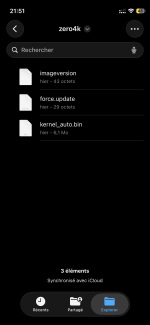
Flash these file by unpacking in the root of a normal usb stick.. remember to remove the old vuplus/<box> folder

These files need to be flashed on a box already with kexec multiboot

you should use a fat32 formatted stick and preserve the directory like on the zip... like a normal image
\vuplus\<box>\kernel_auto.bin


- STARTUP_RECOVERY on usb isn't read any more
- To enter the menu if you put wait = 0 keep pressed MENU on the remote
- The menu will be shown on the tv and on the TFT if available


This will be the default kexec multiboot in next images
 

Attachments

Last edited:
Flash these file by unpacking in the root of a normal usb stick.. remember to remove the old vuplus/<box> folder

- STARTUP_RECOVERY on usb isn't read any more
- To enter the menu if you put wait = 0 keep pressed MENU on the remote
- The menu will be shown on the tv and on the TFT if available


This will be the default kexec multiboot in next images
I'm completely lost. Do I install this file before flashing my receiver, do I put it inside the image installation folder, or do I install it after flashing my image?
 
Back
Top