Vu+ Real Multiboot Now Available

Yes I did. Flashed the kernel_auto.bin from usb pen.
the strange thing is that the splash screen correctly shows that openbh is booting from slot 12, which is the slot I upgraded from 5.6.004 to 5.6.005, but I can't access the boot manager from the image nor can I boot the recovery image in any way
In the / or /boot directory you should have a kexec-stage*.log... (Don't remember the exact name, try reading that log, or post it if you need help in understanding it... Maybe it could help)
 
..
And what about if you do

cat /proc/cmdline

from command prompt? Do you see kexec=1?

If not it seems the kernel_auto.bin you flashed isn't the kexec enabled kernel
 
when I do cat /proc/cmdline , the response is:
libata.force=1:3.0G,2:3.0G,3:3.0G root=/dev/mmcblk0p9 rootfstype=ext4 rootflags=data=journal rootwait rw coherent_pool=2M vmalloc=622m bmem=630m@394m bmem=383m@1665m bmem=443m@2625m .
It is clear that there is no more the kexec enabled kernel, but it all started from a normal image update from 5.6.004 to 5.6.005 !
At this point, do I have to reflash the recovery image, losing all 12 (sic!) other images?
 
when I do cat /proc/cmdline , the response is:
libata.force=1:3.0G,2:3.0G,3:3.0G root=/dev/mmcblk0p9 rootfstype=ext4 rootflags=data=journal rootwait rw coherent_pool=2M vmalloc=622m bmem=630m@394m bmem=383m@1665m bmem=443m@2625m .
It is clear that there is no more the kexec enabled kernel, but it all started from a normal image update from 5.6.004 to 5.6.005 !
At this point, do I have to reflash the recovery image, losing all 12 (sic!) other images?
Did you flashed just kexec_auto.bin from github? You didn't flashed a full the rootfs.tar.bz2 , right? (if you flashed rootfs you lost all the images, sorry)

I know... :-( we discovered a bug in kernel update that overwrite multiboot kernel.
We fixed it with https://github.com/oe-alliance/oe-alliance-core/commit/ab1097f25db559daa75687df3e667ac8cadf3d38 but the fix will be active with next build

if you browse the current image you have you should still have all the startup slot somewhere...

in / you should still have STARTUP_n (try checking with a ftp client or with telnet/ssh )
ls -la /

If you still have /STARTUP_n, try opening a ssh/telnet session to the box and paste the command in bold:

ONLY FOR DUO4K SE:
wget -O /tmp/kernel_auto.bin https://github.com/oe-alliance/kexec-multiboot/raw/refs/heads/main/vuduo4kse/kernel_auto.bin
[[ ! -f /usr/bin/kernel_auto.bin ]] && cp /tmp/kernel_auto.bin /usr/bin/kernel_auto.bin
dd if=/usr/bin/kernel_auto.bin of=/dev/mmcblk0p6
reboot


They will download the kexec kernel and flash to the kernel partition and then reboot... This should fix...

good luck and let me know
 
nothing! There is no STARTUP_n on the box, but I made a big mistake, because I copied in telnet commands you posted anyway. Now the box is stucked on splash screen...
 
nothing! There is no STARTUP_n on the box, but I made a big mistake, because I copied in telnet commands you posted anyway. Now the box is stucked on splash screen...
Sorry but it seems that you wiped all the slots during the attempts to recover the box. I have no other suggestion to recover your slots. I hope someone other have other ideas.
 
...in case we use Chkroot Multiboot, on VU+ Zero, if we have OpenATV 7.6 in the flash and on USB e.g. OpenBH 5.6.005 and OpenATV 8.0, then in the case of OpenBH there is no link to the Recovery partition in the Multiboot Image Selector....
 
Hello,
during the initial setup I didn't enable the multiboot option, I'd now like to use it now.
Is it possible to enable multiboot after the initial setup without reflashing the image?
If a reflash is required, can I create a full image backup of my current installation, perform a clean flash of openbh 5.6 with multiboot enabled, and then restore or install my backed-up image as one of the multiboot slots without losing the multiboot configuration?
 
After some time... new work in progress..

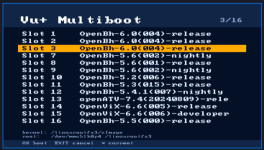
By pressing a key on the remote while the splash screen is visible on the tv, a bootmenu will appear, so you can choose to enter into the image or into the recovery without the usb stick (that will be still supported)

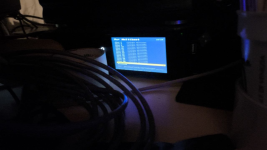
If the box have a tft display onboard, there will be the same menu or the selected entry on the display.

- packaged and in test phase for:
vusolo4k, vuzero4k, vuultimo4k,
vuduo4kse, vuuno4k, vuuno4kse,
vuduo4k


1791405495045.png1791405431154.png
 
Last edited:
In other words; with versions later than 5.2, slot 0 is unusable, as I explained in my previous post. And instead of having 3 slots for other images, there are only 2. Slot 1 is dedicated to OpenBH, which is automatically installed upon enabling multiboot. It’s as if the image in slot 1 acts as a recovery mode. I hope I’ve explained the problem clearly.
 
In other words; with versions later than 5.2, slot 0 is unusable, as I explained in my previous post. And instead of having 3 slots for other images, there are only 2. Slot 1 is dedicated to OpenBH, which is automatically installed upon enabling multiboot. It’s as if the image in slot 1 acts as a recovery mode. I hope I’ve explained the problem clearly.
- which box?
- which image in recovery?
 
Vu+ zero 4k
Openbh 5.3, 5.4, 5.5, 5,6.
Apparently, you aren't reading the previous messages. I am sorry to have to tell you that.
Will give a test with this new kernel.
In other words; with versions later than 5.2, slot 0 is unusable, as I explained in my previous post. And instead of having 3 slots for other images, there are only 2. Slot 1 is dedicated to OpenBH, which is automatically installed upon enabling multiboot. It’s as if the image in slot 1 acts as a recovery mode. I hope I’ve explained the problem clearly.
I think there was a misunderstanding:

When you convert the image to multiboot, the image in flash is cloned into slot1.
-the image in flash is shrinked and stripped down and become the slot0.
- The slot 1 become the opening that was previously on flash.
If something go wrong, you can boot into slot0 to reinstall the other three slot.
So, slot1 can be overwritten.

Slot0 has never been considered to be "usable" for daily operation and watching tv, except to maintain the other slots.

However you can try to create a 4th slot by connecting into FTP and copying STARTUP_3 TO STARTUP_4 and modifying it by changing linuxrootfs3 to linuxrootfs4 to get a new slot.
 
Will give a test with this new kernel.

I think there was a misunderstanding:

When you convert the image to multiboot, the image in flash is cloned into slot1.
-the image in flash is shrinked and stripped down and become the slot0.
- The slot 1 become the opening that was previously on flash.
If something go wrong, you can boot into slot0 to reinstall the other three slot.
So, slot1 can be overwritten.

Slot0 has never been considered to be "usable" for daily operation and watching tv, except to maintain the other slots.

However you can try to create a 4th slot by connecting into FTP and copying STARTUP_3 TO STARTUP_4 and modifying it by changing linuxrootfs3 to linuxrootfs4 to get a new slot.
When I boot to recovery mode (slot 0), the device hangs on the bootlogo and I can't do anything. I must reflash the receiver or FTP into it to select booting on slot 1.
 
To clarify further, when I boot into recovery mode on slot 0, the receiver remains stuck on the bootlogo. Nothing appears on the screen—there is no menu to delete or install another image on the other slots. This issue is observed on images newer than 5.2. OpenBH 5.2 works properly, and I can use recovery mode to maintain the other slots
 
Back
Top