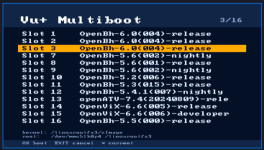
Vu+ Real Multiboot Now Available

Yes I did. Flashed the kernel_auto.bin from usb pen.
the strange thing is that the splash screen correctly shows that openbh is booting from slot 12, which is the slot I upgraded from 5.6.004 to 5.6.005, but I can't access the boot manager from the image nor can I boot the recovery image in any way
In the / or /boot directory you should have a kexec-stage*.log... (Don't remember the exact name, try reading that log, or post it if you need help in understanding it... Maybe it could help)
 
..
And what about if you do

cat /proc/cmdline

from command prompt? Do you see kexec=1?

If not it seems the kernel_auto.bin you flashed isn't the kexec enabled kernel
 
when I do cat /proc/cmdline , the response is:
libata.force=1:3.0G,2:3.0G,3:3.0G root=/dev/mmcblk0p9 rootfstype=ext4 rootflags=data=journal rootwait rw coherent_pool=2M vmalloc=622m bmem=630m@394m bmem=383m@1665m bmem=443m@2625m .
It is clear that there is no more the kexec enabled kernel, but it all started from a normal image update from 5.6.004 to 5.6.005 !
At this point, do I have to reflash the recovery image, losing all 12 (sic!) other images?
 
when I do cat /proc/cmdline , the response is:
libata.force=1:3.0G,2:3.0G,3:3.0G root=/dev/mmcblk0p9 rootfstype=ext4 rootflags=data=journal rootwait rw coherent_pool=2M vmalloc=622m bmem=630m@394m bmem=383m@1665m bmem=443m@2625m .
It is clear that there is no more the kexec enabled kernel, but it all started from a normal image update from 5.6.004 to 5.6.005 !
At this point, do I have to reflash the recovery image, losing all 12 (sic!) other images?
Did you flashed just kexec_auto.bin from github? You didn't flashed a full the rootfs.tar.bz2 , right? (if you flashed rootfs you lost all the images, sorry)

I know... :-( we discovered a bug in kernel update that overwrite multiboot kernel.
We fixed it with https://github.com/oe-alliance/oe-alliance-core/commit/ab1097f25db559daa75687df3e667ac8cadf3d38 but the fix will be active with next build

if you browse the current image you have you should still have all the startup slot somewhere...

in / you should still have STARTUP_n (try checking with a ftp client or with telnet/ssh )
ls -la /

If you still have /STARTUP_n, try opening a ssh/telnet session to the box and paste the command in bold:

ONLY FOR DUO4K SE:
wget -O /tmp/kernel_auto.bin https://github.com/oe-alliance/kexec-multiboot/raw/refs/heads/main/vuduo4kse/kernel_auto.bin
[[ ! -f /usr/bin/kernel_auto.bin ]] && cp /tmp/kernel_auto.bin /usr/bin/kernel_auto.bin
dd if=/usr/bin/kernel_auto.bin of=/dev/mmcblk0p6
reboot


They will download the kexec kernel and flash to the kernel partition and then reboot... This should fix...

good luck and let me know
 
nothing! There is no STARTUP_n on the box, but I made a big mistake, because I copied in telnet commands you posted anyway. Now the box is stucked on splash screen...
 
nothing! There is no STARTUP_n on the box, but I made a big mistake, because I copied in telnet commands you posted anyway. Now the box is stucked on splash screen...
Sorry but it seems that you wiped all the slots during the attempts to recover the box. I have no other suggestion to recover your slots. I hope someone other have other ideas.
 
Back
Top