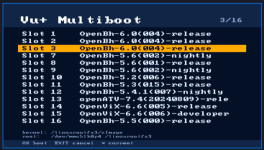
Vu+ Real Multiboot Now Available

Yes I did. Flashed the kernel_auto.bin from usb pen.
the strange thing is that the splash screen correctly shows that openbh is booting from slot 12, which is the slot I upgraded from 5.6.004 to 5.6.005, but I can't access the boot manager from the image nor can I boot the recovery image in any way
In the / or /boot directory you should have a kexec-stage*.log... (Don't remember the exact name, try reading that log, or post it if you need help in understanding it... Maybe it could help)
 
..
And what about if you do

cat /proc/cmdline

from command prompt? Do you see kexec=1?

If not it seems the kernel_auto.bin you flashed isn't the kexec enabled kernel
 
when I do cat /proc/cmdline , the response is:
libata.force=1:3.0G,2:3.0G,3:3.0G root=/dev/mmcblk0p9 rootfstype=ext4 rootflags=data=journal rootwait rw coherent_pool=2M vmalloc=622m bmem=630m@394m bmem=383m@1665m bmem=443m@2625m .
It is clear that there is no more the kexec enabled kernel, but it all started from a normal image update from 5.6.004 to 5.6.005 !
At this point, do I have to reflash the recovery image, losing all 12 (sic!) other images?
 
when I do cat /proc/cmdline , the response is:
libata.force=1:3.0G,2:3.0G,3:3.0G root=/dev/mmcblk0p9 rootfstype=ext4 rootflags=data=journal rootwait rw coherent_pool=2M vmalloc=622m bmem=630m@394m bmem=383m@1665m bmem=443m@2625m .
It is clear that there is no more the kexec enabled kernel, but it all started from a normal image update from 5.6.004 to 5.6.005 !
At this point, do I have to reflash the recovery image, losing all 12 (sic!) other images?
Did you flashed just kexec_auto.bin from github? You didn't flashed a full the rootfs.tar.bz2 , right? (if you flashed rootfs you lost all the images, sorry)

I know... :-( we discovered a bug in kernel update that overwrite multiboot kernel.
We fixed it with https://github.com/oe-alliance/oe-alliance-core/commit/ab1097f25db559daa75687df3e667ac8cadf3d38 but the fix will be active with next build

if you browse the current image you have you should still have all the startup slot somewhere...

in / you should still have STARTUP_n (try checking with a ftp client or with telnet/ssh )
ls -la /

If you still have /STARTUP_n, try opening a ssh/telnet session to the box and paste the command in bold:

ONLY FOR DUO4K SE:
wget -O /tmp/kernel_auto.bin https://github.com/oe-alliance/kexec-multiboot/raw/refs/heads/main/vuduo4kse/kernel_auto.bin
[[ ! -f /usr/bin/kernel_auto.bin ]] && cp /tmp/kernel_auto.bin /usr/bin/kernel_auto.bin
dd if=/usr/bin/kernel_auto.bin of=/dev/mmcblk0p6
reboot


They will download the kexec kernel and flash to the kernel partition and then reboot... This should fix...

good luck and let me know
 
Back
Top